Request a demo
AI agents for regression testing

From brief to regression suite in minutes, with agents that explain every failure

Paste a sentence about your app. InsightTestBench agents crawl it, build a feature tree, write cases grounded in real selectors, run them on a schedule and tell you whether each failure is the test, the product or the environment.

  • 11 agents on InsightWorker
  • Cases read from the live page
  • Webhook only on regressions
  • Self-hosted with Docker Compose
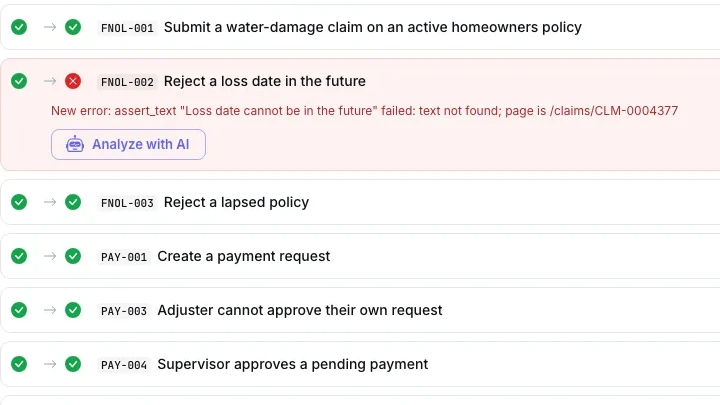
Run comparison · demo data
InsightTestBench run comparison: last night's run against the baseline, two cases flagged as regressions with the failed assertion and an Analyze with AI button, six still passing
Tonight's run against the last green baseline: two regressions, each with the assertion that failed and one click to the root-cause agent. Made-up example data.
The AI agents

Eleven agents, one QA loop

Each agent has one job and leaves its work where your team can read it: a plan, a case, a run, a diagnosis, a draft pull request. They prepare; your QA team and developers decide.

1 · Bootstrap

From a brief to a project

  • Test Suite BootstrapCrawls the app, builds the feature tree, personas and one plan per feature, plus a regression suite.
  • Test Plan GeneratorTurns a feature brief into scenarios with steps and expected results.
  • Sample Data GeneratorWrites synthetic files the cases upload, so no real data is needed.

You decide: the QA manager reviews the feature tree and plans, and refines them with a brief.
2 · Ground

Cases that match the page

  • Vision Case GeneratorReads a screenshot and the DOM, and only uses labels and selectors it can see.
  • Form Profile GeneratorOne happy path, the negatives and every dropdown option for a form.
  • Regression BuilderConverts UI cases into API cases where an endpoint exists.

You decide: append or replace, so cases you tuned by hand stay yours.

3 · Run and explore

Runs you can compare

  • Test ExecutorOne browser, one login, every case in session: UI, API and data checks, with screenshots.
  • Agentic ExplorerDrives the live site, records each defect with repro steps and proposes cases.
  • Exploration Chat AgentAdds, edits or captures cases from a chat on the project page.

You decide: a person promotes an explorer finding into the suite.

4 · Diagnose and fix

Failures that explain themselves

  • Failure RCATest design, product bug or environment, with a likely cause, a suggested fix and a confidence.
  • Bug-Fix EngineerFinds the likely faulty code, pushes a fix branch and opens a pull request.

You decide: below the confidence threshold, or on a protected branch, the PR opens as a draft for review.

Where people stay in charge

Agents prepare. Your team signs off.

The agents write plans, cases and diagnoses. Merging code, changing the suite and holding credentials stay with people and with your own systems.

Plans are reviewed

Bootstrap output lands on the project page as a feature tree and plans you can read, edit by chat or refine with a new brief.

Findings are promoted by a person

The explorer proposes regression cases from what it found; someone promotes each one into a plan with one click.

Fixes arrive as pull requests

The bug-fix agent never merges. Low confidence or a protected branch means a draft PR that a developer reviews.

Secrets stay where they are

The bench stores environment-variable names only. Values stay in Vault, AWS Secrets Manager, Kubernetes secrets or plain env.

How it works

Why regression suites rot, and how the bench keeps them honest

Every team starts with the same plan: ship the feature, then add automation. By the third release the suite references selectors that no longer exist. The bench closes the loop from generating cases against real selectors to explaining failures when they happen.

The usual path, sprint after sprint

Write tests, app changes, tests rot, trust goes

  1. QA opens the app and writes a Playwright test with hand-picked selectors.
  2. A developer refactors the page; selectors and button text change.
  3. Half the suite goes red and triage takes a day.
  4. Most failures are "selector wrong" or "wait too short", and nobody can tell which without re-running locally.
  5. The flaky ones get skipped, and the skip list grows every sprint.
The InsightTestBench path

Brief, suite, scheduled runs, diagnosed failures

  1. Paste a sentence about the app; the bench crawls it and builds a feature tree.
  2. Cases are generated from screenshots and the DOM of the live page: selectors that exist, button text you can see.
  3. Every case ends with explicit assert_* verbs (text, url, aria_invalid, no_console_errors) instead of fuzzy text matching.
  4. The suite runs nightly against staging. When a case fails, the RCA agent classifies it as test_design, product_bug or environmental.
  5. A webhook reaches Slack only on regressions, with the suggested fix attached. When a feature changes, Vision regen refreshes its cases from the new page.
Bootstrap from a brief

Brief in. Test suite out.

Give the bench a sentence about your app and its URL. It logs in, crawls every menu and sub-page, captures each screen, builds a feature tree, derives the personas and generates a per-feature regression suite, plus a responsive-design pass and a UX audit. Results appear on the project page as each step completes.

  • Live crawl: real Playwright sessions, real screenshots, real DOM
  • Feature tree: a diagram of every page and sub-surface
  • Per-feature plans: happy, edge, error and permission cases with realistic personas
  • Cross-cutting plans: desktop, tablet and phone, plus a UX audit
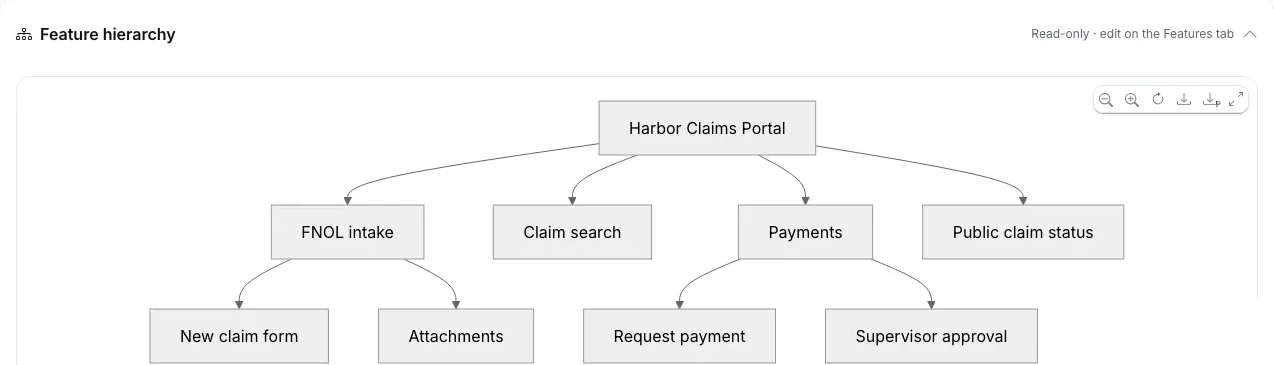
Project · feature hierarchy · demo data
The feature hierarchy generated from a brief: Harbor Claims Portal split into FNOL intake, claim search, payments and public claim status, with sub-features below
Vision-grounded cases

Cases grounded in what is actually on the page

Most flaky tests reference selectors that never existed. The vision-grounded generator takes a real screenshot and a DOM extract of each feature page and only emits selectors it can see. Every case ends with explicit assertions, so a failure points at the real problem.

  • Assertion verbs: assert_text, assert_visible, assert_url, assert_aria_invalid, assert_no_console_errors, assert_response_time_under
  • Form profile sweeps: one happy path, N negatives and each dropdown option, automatically
  • Re-grounding: Vision regen refreshes a feature's cases from the current page
  • Append or replace: keep what you tuned by hand, or start over
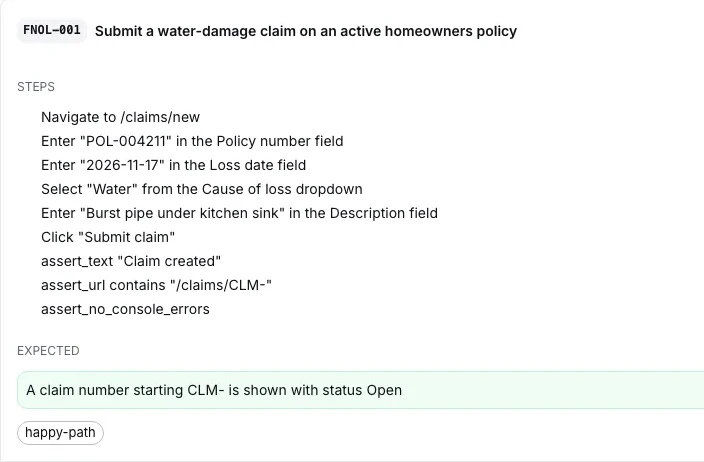
Plan · cases · demo data
A generated case: steps ending in assert_text, assert_url and assert_no_console_errors, and the expected result
Failures explain themselves

Every failure arrives with a verdict

The RCA agent reads the case spec, the step log, the error and the page state, then classifies the failure as test_design, product_bug or environmental with a confidence score and a suggested fix. Bugs above the threshold get a draft PR; flakes get retried.

  • Evidence on every case: per-step screenshots on pass and fail, the full log with timing, console errors at the moment of failure
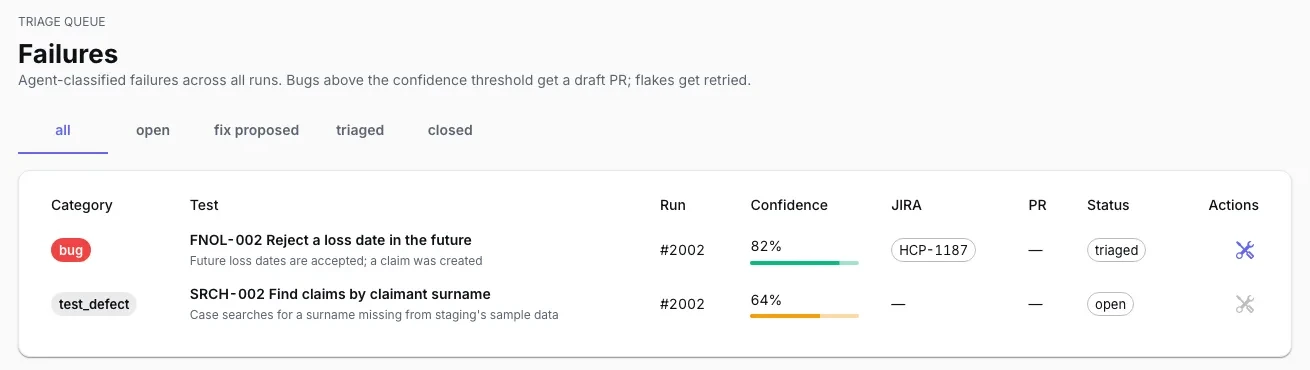
  • Triage queue: category, confidence, JIRA ticket and PR in one list
Failures · triage queue · demo data
Triage queue: one failure classified as a bug at 82 percent confidence with a JIRA ticket, one classified as a test defect at 64 percent
Regression watchdog

Scheduled runs that only ping you when something broke

Schedule a plan daily or on an interval, against any environment and persona. Each run is compared with the last baseline for the same plan, persona and environment, and classified into regressions, fixes, still failing and still passing. The webhook fires on every run, only on failures, or only on regressions, with the RCA attached.

Project · schedules · demo data
A nightly regression schedule on staging at 02:00, with its last run, a notify-on-regressions setting and an enabled switch
Who uses it

Built for every role on the QA loop

Each role gets the surface it needs, and nobody has to read someone else's YAML.

QA manager

Bootstraps from a brief, reviews the feature tree, edits cases by chatting with the agent and watches scheduled runs come in.

Developer

Sees this build against the last green build. The RCA says whether to fix the test, fix the app or check infrastructure.

On-call and SRE

Gets a Slack message only when a regression breaks a user-facing path, with the failed case, the screenshot and the RCA.

IT and platform

Docker Compose install, JWT sign-in out of the box, per-environment URLs, credentials and behaviour, and SSO through your identity provider.

The engine inside

TestBench runs on InsightWorker

Every bench operation, from crawl and case generation to test execution and RCA, runs through an InsightWorker agent on your own machines. The bench is a thin orchestrator: it decides which bundle to run with which inputs and keeps the results. Playwright sessions, multimodal model calls and deterministic shell steps are the engine's job.

That is why every agent here is a normal InsightWorker bundle: plain YAML and a manifest you can read, fork and extend for your own QA workflows.

About InsightWorker
  1. 1
    test-suite-bootstrap crawls the app and builds the feature tree, regression, responsive and UX-audit plans.
  2. 2
    vision-case-generator regenerates a feature's cases from its screenshot and DOM.
  3. 3
    test-executor walks every case in one browser session with one login.
  4. 4
    failure-rca diagnoses each failure: design, bug or environment, with a fix and a confidence.
Built for daily use

Multi-environment, real credentials, real history

The bench is designed for teams that rely on regression coverage every day.

Multi-environment

Per-environment base URLs, login URLs, post-login selectors and per-persona credentials. Promote a suite from staging to production without rewriting cases.

Credentials stay yours

The bench stores only environment-variable names. Secrets live in the store you already use.

Compare runs side by side

Every run is compared with the last baseline for the same plan, persona and environment, and classified automatically.

Schedules and webhooks

Daily-at or interval schedules. A Slack-shaped JSON payload on every run, on failures or on regressions only.

Evidence on every case

Per-step screenshots on pass and fail, the execution log with timing, and console errors at the moment of failure.

Self-hosted

Docker Compose for a laptop or a single VPS. JWT sign-in and first-user-is-admin out of the box. Bring your own MySQL and model keys. Install guide